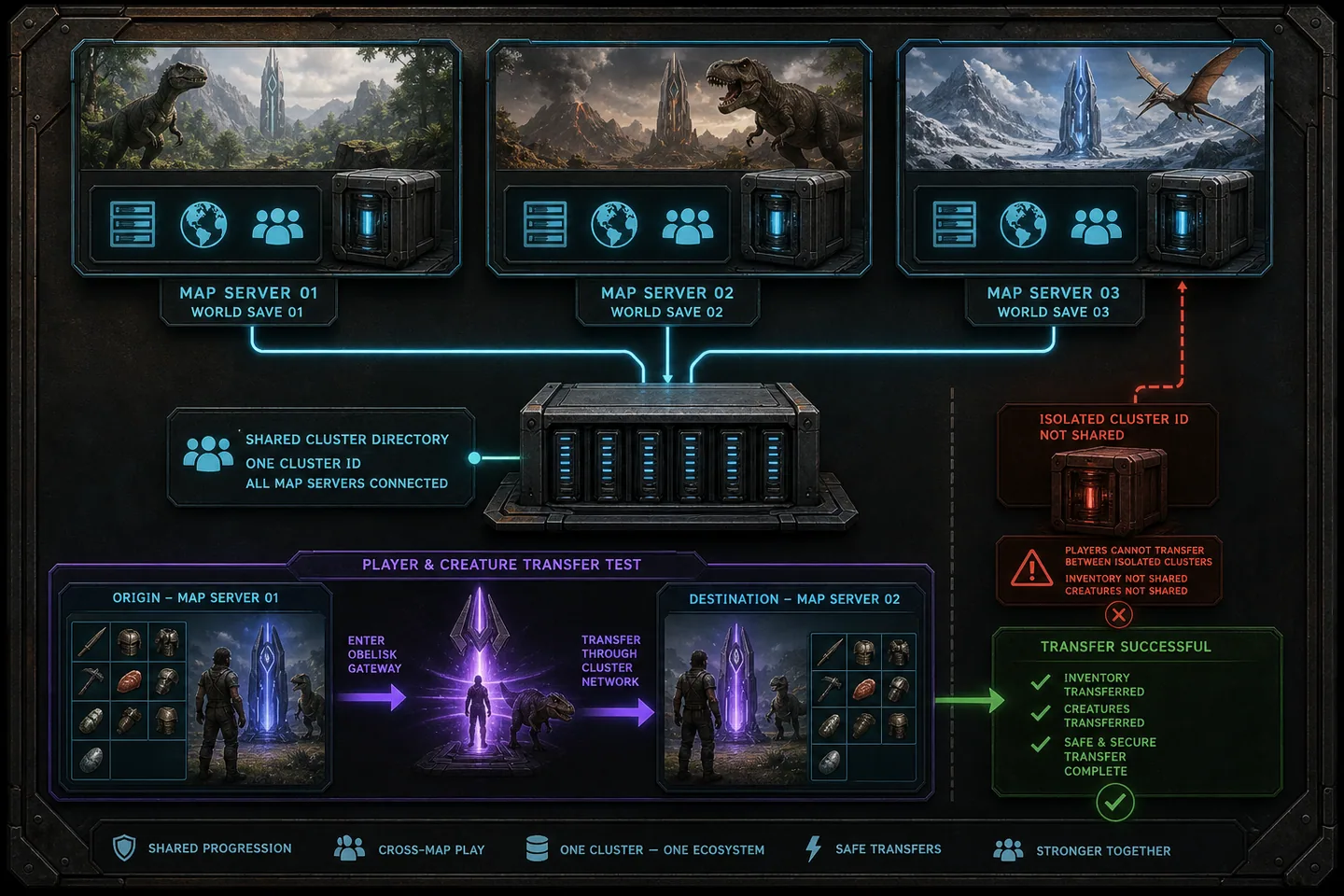
An ARK cluster lets players move between maps without creating an unrelated survivor on each one. The visible list is controlled by a shared cluster ID, while uploaded survivor, item and creature data must be stored in a location that every member server can read and write. Matching only the ID can make maps appear connected even though downloads fail, so identity and storage must be configured together.
Begin with two test maps and a copied save. Transfers touch the most valuable data a player owns, and mistakes can produce missing survivors or duplication. Define what may move, back up every participating map and the shared cluster directory, then test the complete round trip before announcing the cluster publicly.

1. Design the cluster before launching another map
List each map, session name, game port, query port, save directory and expected player capacity. Processes on the same host require unique ports and enough memory to run simultaneously. Decide whether all maps use the same rates, mods and PvE or PvP mode. A cluster can technically list servers that offer a confusing mix, but players need predictable rules before they upload a survivor.
Choose a long, distinctive cluster ID rather than a common word. Other servers using the same generic ID can appear in transfer lists even though they do not share your storage. Treat the ID as a namespace, not as a marketing title. Record it exactly because differences in spelling or case create separate groups.
2. Give every member the same cluster storage
Launch each member with the same cluster ID and the same logical ClusterDirOverride location. On one Windows machine, this can be a dedicated folder accessible by every server process. On multiple machines, the shared location must provide reliable coordinated access and appropriate permissions. A path that exists separately on both machines is not shared merely because the text is identical.
If servers share the ID but not the data directory, players can see destinations yet fail to download what they uploaded. Confirm that the Windows or service accounts running all processes can create, read and modify files in the cluster directory. Back up that directory along with map saves because it may contain an uploaded survivor between departure and arrival.
ArkAscendedServer.exe TheIsland_WP?SessionName=Cluster-Island -clusterid=gio-ark-2026-private -ClusterDirOverride=C:\arkcluster -port=7777 -QueryPort=27015 -log
3. Keep ports, saves and processes separate
Give the second map different game and query ports, and forward them when remote players need access. Keep map saves in their expected ASA directories and avoid starting two processes against the same live map file. Use separate launch scripts and logs so a crash identifies the affected member. Start maps at controlled intervals rather than exhausting memory by launching an entire cluster at once.
Keep the required mod list compatible across destinations. A creature or item created by a mod cannot work on a map that lacks that definition. Map-specific content and transfer restrictions may still apply. Document exceptions on the server page instead of telling players that everything transfers simply because the cluster list appears.
4. Configure transfer rules deliberately
Server settings can allow or prevent downloads of characters, items and creatures. Choose a policy for the whole cluster and verify each member rather than copying one file and assuming it remained unchanged. Restrictions may be useful for progression launches, seasonal maps or preventing outside imports, but unclear rules can strand a survivor or separate a player from valuable creatures.
Test with disposable data first: a new survivor, inexpensive item and low-value tame. Confirm departure, destination download and a return trip. Do not use the tribe owner's only character as the test. Check what happens when the destination is full, restarting or running a different build, and tell players not to upload immediately before planned downtime.
5. Back up the cluster as one system
A backup of one map at noon and another at midnight may describe incompatible transfer states. Coordinate saves and capture all member worlds, configuration and shared cluster storage within one maintenance window. Label the set with one timestamp and preserve it before major updates, map changes or transfer-rule changes.
When restoring, use a consistent set. Mixing an older destination with newer shared upload data can duplicate or lose progression. Keep the failed state separately for investigation. For large clusters, practice restoring into isolated ports and verify one transfer round trip before reopening public access.
6. Troubleshoot from visibility to storage
If a destination does not appear, compare cluster IDs and confirm the destination completed startup. If it appears but download fails, inspect the shared path, permissions and transfer flags. If only a modded object fails, compare mod availability and order. This sequence prevents a storage-permission issue from being mistaken for a browser or router problem.
Review logs from both departure and destination at the transfer time. Preserve the player's identifiers and avoid encouraging repeated uploads while diagnosing. Once corrected, repeat the disposable transfer test before handling the affected survivor. Cluster reliability depends more on disciplined operations than on adding a matching command-line flag once.
Common questions
Frequently asked questions
Is the same cluster ID enough?
No. Member servers also need access to the same cluster data directory for uploaded data to move between them.
Can cluster maps use the same ports?
Not when the processes share one address. Give each running server unique game and query ports and update forwarding rules.
Should I back up only the map receiving players?
Back up all participating maps and shared cluster storage as one timestamped recovery set.